
Dangerous Goods Transport Document: Template, Sample and Mandatory Entries under ADR
In short: ADR does not prescribe a fixed form for the transport document. It defines which information the document must contain. A template works if it covers all mandatory entries and stays up to date. The sample below shows the structure with a fictitious example.
Stop maintaining dangerous goods documents by hand: with eDGD you create transport documents and shipper’s declarations for road, sea and air digitally and check them automatically. Try free for 30 days
Is there an official form?
No. ADR (chapter 5.4) lists the information the transport document must contain, but no mandatory form. Any template that contains this information in the correct order is permitted. For sea and multimodal transport, common forms exist, but they are not mandatory either.
Mandatory entries at a glance
For each dangerous substance, the transport document generally contains, in this order:
- UN number prefixed with “UN”
- proper shipping name, with the technical name for collective entries
- class or label model number
- packing group, where assigned
- tunnel restriction code in brackets
- number and description of packages and the total quantity
- name and address of consignor and consignee
For certain substances and carriage operations, ADR requires additional remarks.
Sample with a fictitious example
| Field | Example entry (fictitious) |
|---|---|
| Consignor | Sample Chemicals Ltd, Example Street 1, 20457 Hamburg |
| Consignee | Example Trading Inc, Sample Way 5, 80331 Munich |
| Dangerous goods entry | UN 1993 FLAMMABLE LIQUID, N.O.S. (Ethanol, Isopropanol), 3, II, (D/E) |
| Packages | 2 steel drums, 200 litres each |
| Total quantity | 400 litres |
| Date and signature | Hamburg, 12.10.2026, signature of the consignor |
This example only illustrates the structure. Classification and entries must be checked against the valid ADR for every real consignment.
When is a template enough, and when is software worth it?
A self-maintained template suits a few, always identical consignments. It becomes error-prone as soon as substances, quantities or modes of transport change: names, tunnel codes and special provisions change with every ADR edition, and sea (IMDG Code) and air (IATA-DGR) bring their own documents. Software with stored substance data then saves time and prevents transcription errors.
How to read the dangerous goods entry in the transport document
UN 1993UN number
FLAMMABLE LIQUID, N.O.S. (Ethanol, Isopropanol)Proper shipping name, with the technical name for collective entries
3Class or label model number
IIPacking group, where assigned
(D/E)Tunnel restriction code in brackets
Followed by number and description of packages, total quantity, and consignor and consignee. Fictitious example.
What a digitally created dangerous goods document looks like
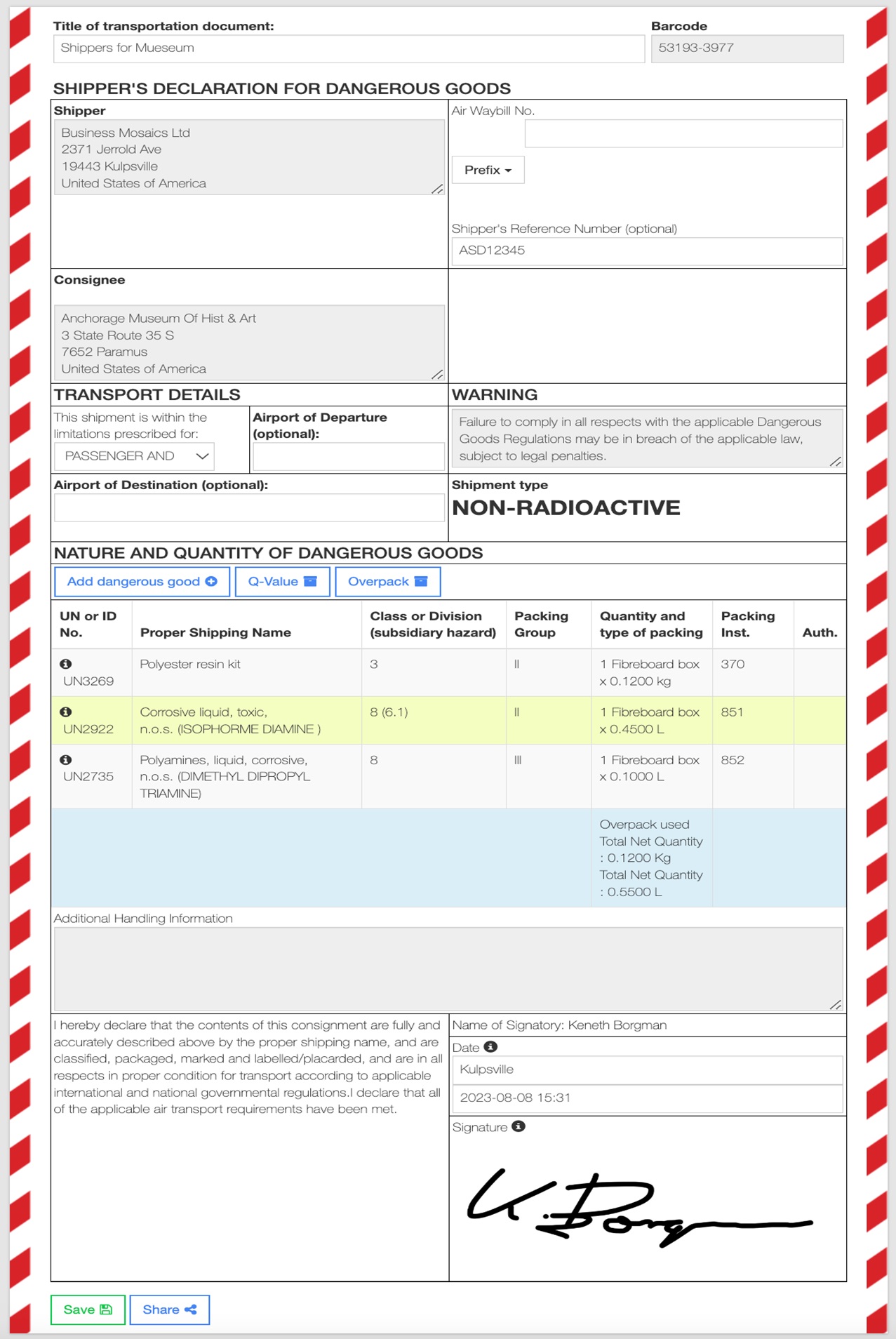
An example from eDGD: the shipper’s declaration for air transport with several UN numbers, overpack, total quantities and digital signature. Substance data and mandatory entries are stored, so typing errors are avoided. For road transport, eDGD creates the ADR transport document in the same way.
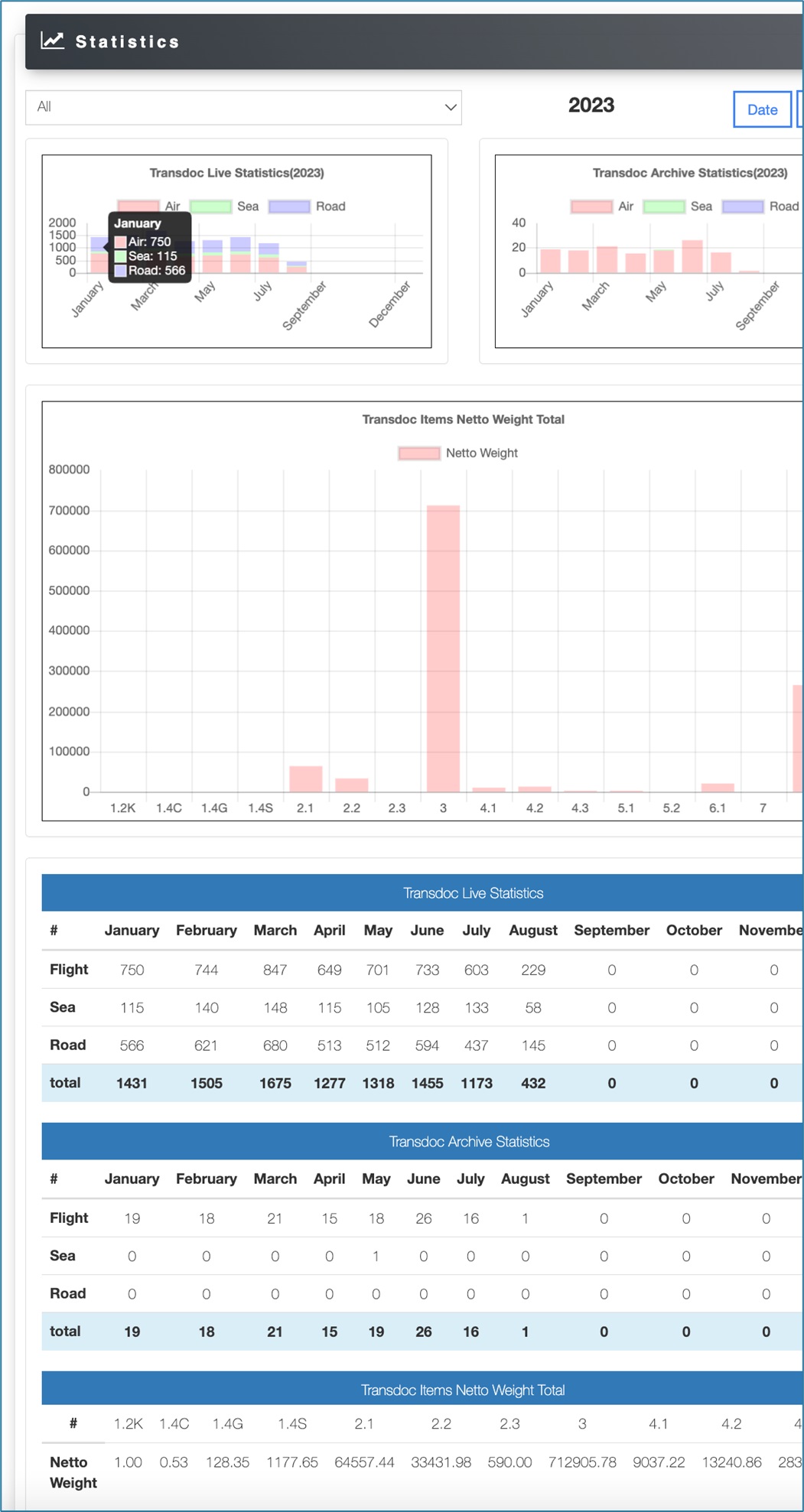
All documents are archived centrally, can be shared and evaluated:
Learn more about eDGD or request a consultation.
Common mistakes with templates
Typical are outdated names from old ADR editions, missing technical names for collective entries, a wrong tunnel restriction code, quantities without a unit and a missing signature. Copying an old document for a new consignment also often causes unnoticed errors.
Frequently asked questions about the transport document template
Is there a free template for the transport document?
Yes, templates are widely available. What matters is that they contain all mandatory ADR entries and are updated regularly to the current edition.
Does the transport document have to be signed?
ADR does not require a signature as such for the road transport document, but many consignors and carriers ask for one. In air transport the signature is mandatory (shipper’s declaration).
Can I keep the transport document digitally?
ADR generally permits electronic procedures if they match paper in evidential value and availability. In a roadside check the document must be presented in legible form. With eDGD you keep transport documents digitally, archived and available at any time.
What is the difference from the shipper’s declaration?
The shipper’s declaration is the signed statement of the consignor in air transport. In road transport the corresponding document is the transport document.
Create transport documents without maintaining templates: with eDGD by NMMN you create transport documents and declarations for road, sea and air.
All information without guarantee. The currently valid edition of ADR applies.